


レシピ動画で料理献立を簡単に - デリッシュキッチン
4.827.00 Reviews
App Specs
- Version
- 3.1.1
- Updated On
- License
- Free
- Downloads
- 5,000,000+
- Developer
- every, Inc.
- Categories
- Food & Drink
- Platform
- Android, iOS
Screenshots






 Analysis by AppCompare
When several people share one kitchen, choosing dinner can take longer than making it. I find a recipe-video app most useful when it helps turn a vague “what should we eat?” into a dish someone can actually start cooking. レシピ動画で料理献立を簡単に - デリッシュキッチン is aimed at that everyday problem: its videos and written steps give a household a common reference, whether one person is cooking or another is checking what ingredients are needed.
A shared screen can make dinner easier to coordinate
Picture a weekday evening: one person is on the way home, another is already in the kitchen, and nobody has settled on a meal. A useful approach is to look for a dish based on what is already available, then have the cook follow the video while someone else reads the ingredient list or handles a side dish. That division of work is simple, but it can prevent the familiar back-and-forth of sending recipe links and trying to explain a step from memory.
I would treat the app as a shared source of cooking instructions, not as a household planner that automatically assigns jobs or keeps everyone’s choices in sync. If two people are using separate devices, it is sensible to agree on the recipe first and make sure both are looking at the same one. A saved collection can help the person who does the planning gather ideas, while a quick verbal handoff tells the cook which dish was chosen.
Keep account and device expectations simple
In a home where a phone or tablet gets passed around, I would decide whose account is being used before saving favorites or building collections. Personal saved recipes can reflect one person’s tastes, while another cook may want a separate shortlist. I would not assume that the app provides individual household profiles or automatic sharing; the practical option is to keep the recipe itself easy to find and communicate the selection directly.
A shared kitchen device also benefits from a little preparation. Open the chosen recipe before hands are wet or busy, check the ingredient list, and set the device somewhere the cook can see without needing to touch it constantly. Videos are helpful for showing a technique, but pausing and replaying with messy hands can be awkward. Reading the written step first, then watching the relevant part, is often a smoother workflow than trying to follow every moment in real time.
Age, confidence, and trust in a recipe
The app is rated for Everyone, which makes it approachable as a family cooking resource, but that rating is not a substitute for supervision around knives, hot pans, or appliances. For a young or inexperienced cook, I would choose a straightforward recipe together, check the equipment and ingredients, and stay nearby for any risky steps. The video can make a method easier to understand; it cannot judge whether a child is ready to handle a particular task.
I also recommend reading the full instructions before starting, especially when a dish is unfamiliar. A short clip can make a recipe look effortless while the written steps reveal timing, preparation, or equipment that matters. That small check helps avoid discovering halfway through that an ingredient needs attention or that the cook has misunderstood the order. For allergies or strict dietary needs, I would verify every ingredient rather than relying only on a category label or a quick visual impression.
Worth Reading Before You Choose

Flipboard Shows What News Apps Must Do Beyond the Feed

Switching to Android Auto Means Rethinking Your Driving Routine

Google Calendar Makes a Crowded Week Easier to Manage

Ludo King Makes the Most of the Minutes Between Plans

Baby Panda World Brings Quick Play to Modern Phones, but Its Game Library Feels Busy

ESPN’s Live Game View Makes Following Close Games Easier
Who benefits most from this kind of cooking app?
I see the strongest fit for people who want visual guidance, cooks who are still learning basic techniques, and households that need fresh dinner ideas without turning meal planning into a project. It can also suit someone who knows how to cook but gets stuck choosing a dish. The combination of recipe discovery and video instruction addresses both the “what should I make?” and “how does this step look?” questions.
It is less compelling for cooks who already have a well-organized personal recipe system, need detailed nutrition planning as their main priority, or prefer to work from a printed cookbook without a screen nearby. It is also not a substitute for careful allergy checks, tailored dietary advice, or a dedicated shared calendar. In those situations, I would use it for inspiration and keep the important household information in the tool that already handles it reliably.
As a Food & Drink app from every, Inc., it has reached over five million installs and holds a 4.8 average from around 61,000 ratings. It is free to download, rated for Everyone, and its current version is 3.0.8; optional in-app purchases range from $4.49 to $42.99 per item. Those figures tell me it has found a broad audience, but they do not guarantee that every recipe suits my kitchen, so I still judge each dish by its ingredients, instructions, and fit for the people eating.
The User Experience
From the moment you open レシピ動画で料理献立を簡単に - デリッシュキッチン, you’re greeted with a clean and inviting interface. The app is designed to be user-friendly, with intuitive navigation that makes it easy to find your way around. The home screen showcases a variety of recipe categories, from quick meals to gourmet dishes, ensuring there's something for everyone.
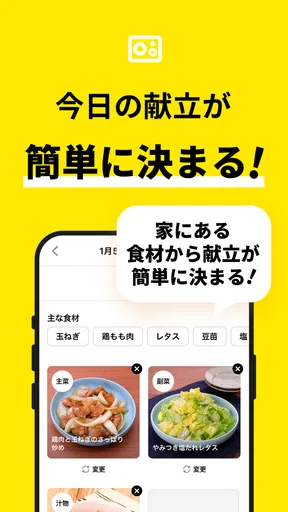
The search functionality is a real lifesaver. You can search for recipes by ingredients, which is perfect for those times when you've got a random assortment of items in your kitchen and no idea how to combine them into something edible. The app also allows you to filter recipes by dietary needs, such as vegetarian or gluten-free, making it accessible for a wide range of users.
Recipe Variety and Quality
One of the standout features of this app is its vast array of recipes. Whether you're a fan of traditional Japanese cuisine or you're craving something more international, you'll find plenty of options to tickle your taste buds. Each recipe comes with a detailed list of ingredients and step-by-step instructions. What’s more, you’ll find helpful videos that guide you through the cooking process, making it a fantastic tool for visual learners.
The quality of the recipes is impressive. I tried out a few dishes, including a savory miso soup and a delightful matcha cheesecake, and each turned out beautifully. The instructions were clear, and the cooking times were spot-on, which is often a hit-or-miss with other cooking apps.
Community and Social Features
Another nifty aspect of the app is its community-driven features. Users can leave comments on recipes, sharing tips or modifications they've made. This adds a social element to the app, allowing you to connect with other cooking enthusiasts. You can also save your favorite recipes and create custom collections, which is perfect for meal planning or prepping for special occasions.
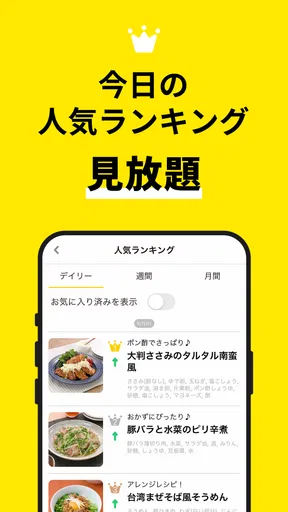
Additionally, the app offers a "trending" section, highlighting popular recipes that are currently gaining traction among users. It's a great way to discover new dishes and get inspired to try something outside your usual repertoire.
Subscription and Pricing
While the app is free to download and offers a substantial amount of content at no cost, there is a premium subscription available. The premium version unlocks additional recipes and features, such as detailed nutritional information and advanced search options. Honestly, the free version provides more than enough to keep you busy in the kitchen, but for those looking to dive deeper, the premium subscription might be worth considering.
Making videos work in a real kitchen
Compared with a text-only recipe site, the clearest advantage here is seeing what a technique is supposed to look like. That matters when the written phrase is vague to a beginner, such as how finely to chop something or what a mixture should look like before moving on. Compared with a general video platform, a recipe-focused app gives the instructions and ingredients a more central role, so I am less likely to lose the method in a long stream of unrelated cooking clips.
There is a trade-off: a video is not always the fastest way to look up one detail. If I already know the recipe and only need to check a temperature or quantity, written instructions are quicker to scan. I use the clip for unfamiliar hand movements or stages that are hard to describe, then rely on the written recipe to keep my place. That combination is more practical than watching from beginning to end while trying to cook at the same time.
Ingredient search is especially useful when treated as a starting point rather than a promise that every item in the fridge will fit perfectly. I would search for the main ingredient I want to use, open a few plausible recipes, and check which one asks for the fewest extra purchases. This is a better way to reduce waste than choosing a dish solely because one ingredient matches. It also gives me a chance to notice whether a recipe depends on a particular seasoning or tool before I commit.
Small planning habits that reduce kitchen friction
For a shared meal, I would make a short shortlist before anyone starts cooking: one person can browse, while the person who will cook checks the ingredients and decides whether the method feels manageable. Saving a recipe is useful for future reference, but a collection works best when it has a clear purpose, such as reliable weeknight meals or dishes to try on a weekend. If everything gets saved indiscriminately, the collection can become another place to search instead of a shortcut.
Another practical habit is to read the full recipe once before beginning, then use the video selectively. That catches preparation tasks that need to happen before the pan is hot and helps the household divide work sensibly. Someone can wash or measure ingredients while the cook handles the stove. It is a modest workflow adjustment, but it makes a recipe app more useful for coordination without assuming that it has dedicated household-management features.
When a recipe is new, I would avoid making it the center of a meal with a strict serving time unless I have checked the steps and feel comfortable with them. A video can make the process easier to follow, but an unfamiliar dish still takes attention. For guests or a busy evening, I prefer a recipe I have already tried; I use the app’s variety for low-pressure experiments when there is room to adjust.
Cost, device fit, and the right expectations
The app is free, with optional purchases priced from $4.49 to $42.99 per item. I would start with the free experience and decide whether any paid option solves a specific need before spending. If the main goal is finding dinner ideas and following basic cooking videos, paying is not automatically necessary. If advanced search or nutrition details would make a real difference to how someone plans meals, then it is worth checking the purchase details in the app rather than assuming every extra is included.
It was released on March 7, 2018, and version 3.0.8 requires Android 8.0 or later. That gives Android users a concrete compatibility check before installing; anyone using another platform should confirm the requirements for their own device. In a household with one shared screen, I would also think about placement and battery before cooking. A stable stand or safe counter spot makes a video easier to follow, while keeping the phone away from splashes reduces the temptation to handle it with wet hands.
There are limits to the format. Recipe videos show one intended route, but home kitchens differ in pan size, heat, ingredient brands, and cook experience. If a result looks different from the clip, I do not assume the recipe has failed immediately; I check the written step and use ordinary cooking judgment. The app can make guidance more approachable, but it cannot adapt automatically to every stove or replace common-sense food handling.
Final Thoughts
Overall, レシピ動画で料理献立を簡単に - デリッシュキッチン is a fantastic tool for anyone looking to enhance their culinary skills or simply get dinner on the table with minimal fuss. Its user-friendly design, diverse recipe selection, and engaging community features make it a standout in the cooking app space.
Whether you're a seasoned chef or a kitchen novice, this app is sure to become a staple on your smartphone. Happy cooking!
My household verdict
I would recommend it to a household that wants a friendly way to choose and follow recipes together, especially when at least one person benefits from seeing a technique rather than reading about it. It is also a good fit for someone who wants inspiration but does not need a rigid meal-planning system. The videos, ingredient-based discovery, written steps, and saved collections can support a useful routine, provided the household agrees on how it will share decisions and recipe choices.
I would skip it as the main solution if my priority were automatic coordination between several cooks, precise nutrition planning, or a carefully managed allergy database. Those needs call for tools or professional guidance designed specifically for them. For everyday cooking, though, I find its best role clear: help me move from a handful of ingredients and a dinner question to a recipe I can understand well enough to cook.
Pros
- User-friendly interface for easy navigation.
- Wide variety of recipes for all cuisines.
- Step-by-step video guides enhance learning.
- Regular updates with new recipe ideas.
- Supports meal planning and grocery lists.
Cons
- Limited offline access to recipes.
- Some features require in-app purchases.
- Ads can be intrusive during usage.
- No option for personalized dietary needs.
- Videos require a stable internet connection.
FAQs for レシピ動画で料理献立を簡単に - デリッシュキッチン
What is レシピ動画で料理献立を簡単に - デリッシュキッチン?
レシピ動画で料理献立を簡単に - デリッシュキッチン is a cooking app designed to simplify meal planning and preparation. It offers a wide range of recipe videos that guide users through the cooking process with step-by-step instructions. This app is perfect for both beginners and experienced cooks looking for inspiration and guidance.
Is the app available in multiple languages?
Currently, the app is primarily available in Japanese. However, users can often navigate the app with ease due to its intuitive design and the visual nature of the recipe videos. Check the app store for any updates regarding language support or localization options.
Are the recipes suitable for all dietary preferences?
デリッシュキッチン offers a variety of recipes that cater to different dietary preferences, including vegetarian, vegan, and gluten-free options. Users can search and filter recipes based on their dietary needs, making it easy to find suitable dishes for any meal or occasion.
Does the app require an internet connection to function?
Yes, an internet connection is required to stream the recipe videos. This ensures that users have access to the latest recipes and updates. However, some features or recipes may be available offline if downloaded in advance, depending on app settings.
Is there a cost associated with using the app?
The app offers a basic version that is free to download, with access to a wide range of recipes and features. For users seeking additional content or an ad-free experience, there might be a premium subscription available. Always check the app store for the latest pricing details and subscription options.


